
Keyboard Layout Watcher
STOP ACCIDENTAL KEYBOARD LAYOUT SWITCHING ON WINDOWS
Overview
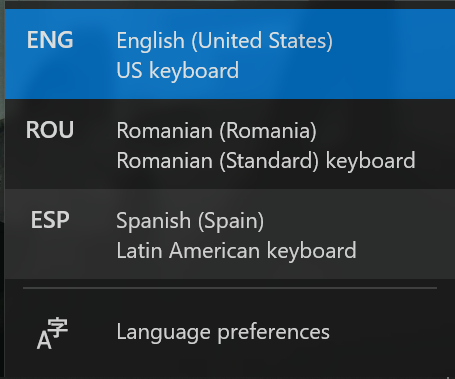
If you use multiple keyboard layouts on Windows, accidental layout switching is a common and frustrating problem.
A single unintended Win + Space press can silently change the active layout,
causing you to type the wrong characters without noticing immediately.
This often breaks concentration, leads to mistakes, and interrupts your workflow — especially when writing code, messages, or passwords.
Keyboard Layout Watcher solves this by giving you full control over when keyboard layouts are allowed to change.
It runs quietly in the background and ensures that layout switching only happens when you intend it to.
Why

Accidental keyboard layout switching is a small problem, but it happens often and always at the wrong moment. Each unnoticed switch interrupts your flow, forces you to correct mistakes, and pulls your attention away from what you were actually doing.
Windows provides no clear feedback or protection against unintended layout changes. Keyboard Layout Watcher exists to close this gap by making layout switching intentional instead of accidental.
The result is simple: Fewer interruptions, fewer errors, and a smoother, more focused typing experience — especially for users who rely on multiple keyboard layouts every day.
Features
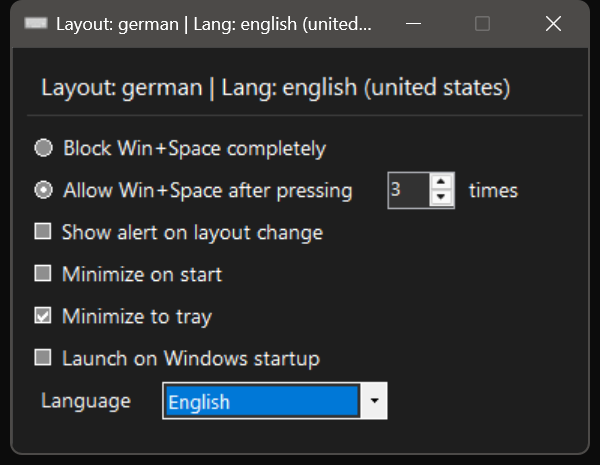
- Prevents accidental keyboard layout switching caused by Win + Space
- Disable WINDOWS + Space Bar shortcut to switch between languages<br/>Option to block the shortcut entirely
- Option to require multiple intentional presses before switching layouts
- Optional notification when the keyboard layout changes
- Runs quietly in the system tray
- Starts automatically with Windows
- Lightweight, unobtrusive, and easy to disable or remove
How to use Keyboard Layout Watcher
Update to block alt+shift shortcut
Download
Keyboard Layout Watcher is designed to be simple, safe, and easy to try.
It works on Windows 10 and Windows 11. No installation required!
Just download and run the file. It runs quietly in the system tray and can start automatically with Windows.
The tool is lightweight, does not modify system files and can be closed at any time without side effects.
Keyboard Layout Watcher is developed and maintained by the registered German company XIDA GmbH.
Download Keyboard Layout Watcher to prevent accidental keyboard layout switching and keep your typing uninterrupted.